
WooCommerce doesn’t give customers a way to manage their own WooCommerce account deletion. By default, the only option is for a store admin to remove accounts manually from the WordPress dashboard — and that’s a problem, now that data privacy laws like GDPR and CCPA require you to honour deletion requests promptly.
If a customer asks you to delete their account and you’re still doing WooCommerce account deletion manually, one request at a time, you’re already behind. This guide covers why frontend account deletion matters, what to watch out for before turning it on, and the easiest way to set it up without writing any code.
Why Letting Customers Delete Their Own Account Matters
A lot of store owners assume keeping every account is a good thing — more users, more remarketing reach, more chances of a repeat customer. That’s not entirely wrong, but it overlooks a few real downsides that get worse the longer those accounts sit untouched. And it doesn’t change the fact that customers expect more control over their own data these days.
1. Respecting the Law Under GDPR and CCPA
The GDPR’s “right to be forgotten” means that if a customer asks you to delete their data, you have to act on it promptly. The CCPA gives California residents the same right. Without an effective deletion process, your store risks being seen as non-compliant — which can mean fines and legal headaches you’d rather avoid.
Letting customers handle this themselves, instead of routing every request through an admin, is becoming the norm rather than the exception. It tells customers you take their data seriously, and it saves you from manually processing every single request.
2. Security Concerns for Dormant Accounts
Old, inactive accounts are an easy target. They tend to carry weak or reused passwords — often the same ones exposed in other data breaches. That’s what makes credential stuffing attacks work: hackers just try stolen login combos across thousands of sites until something hits.
Have I Been Pwned alone tracks billions of compromised credentials. If even a handful of your dormant users reuse those passwords, your store is exposed. Fewer dormant accounts simply means less to worry about.
3. Database Bloat and Site Performance
Run a store for a few years and you’ll end up with thousands of registered accounts, many from people who bought once and never came back. Each one is still sitting there with metadata, addresses, and order history attached.
That adds up, slower queries, bigger backups, more server load. Letting customers clear out their own accounts is a small thing that keeps your database (and your site) running better.
4. Trust and Transparency with Customers
Customers know their data rights better than they used to. If deleting an account is hard or impossible, you risk losing their trust, getting a bad review, or worse — having them escalate to a formal erasure request you now have to deal with manually. A simple self-service option shows you’re not making this harder than it needs to be.
What to Consider Before Enabling Customer WooCommerce Account Deletion
Loss of Order History: Deleting an account can wipe out or unlink the order records tied to it. For tax and accounting purposes, you’ll want to keep anonymised order data – strip the personal details, keep the financial ones.
Impact on Email Marketing & Analytics: Once an account is deleted, that person comes out of your email lists, loyalty programs, and analytics. That’s the point — you can’t keep marketing to someone who’s asked to be erased. Just make sure your privacy policy and the deletion screen both say so clearly.
Accidental Deletions: Without safeguards, someone might delete their account by mistake. A confirmation step, re-entering a password, or clicking a link sent by email – isn’t optional here. Make the irreversibility obvious before the final click.
Best Practices for Safe Frontend Account Deletion in WooCommerce
Whether you implement frontend deletion manually or with a plugin, these practices ensure the process is secure, compliant, and user-friendly.
1. Require Identity Verification Before Deletion
Don’t let anyone delete an account without proving it’s actually theirs — password confirmation or a one-time email link both work. Skip this and you’re one hijacked session or shared device away from someone deleting an account that isn’t theirs.
2. Display Clear and Prominent Warnings
The deletion screen should be very clear about what will be lost – personal information, saved addresses, access to orders, loyalty points, and that this action cannot be undone.
3. Anonymize Order Data Rather Than Hard Deleting It
Strip the names, emails, and billing details, but keep the order totals and transaction data. That keeps you compliant with privacy law without breaking your books.
4. Send a Deletion Confirmation Email
Once it’s done, email the customer to confirm it. It gives them proof, and it gives you a paper trail if a regulator ever comes asking.
5. Document the Process in Your Privacy Policy
Spell out how deletion works, what gets removed versus retained, and how long it takes. This isn’t just good practice — it’s expected.
How to Let Customers Delete Their WooCommerce Account Without Custom Code
Doing all of this manually means custom PHP, template overrides, a full verification flow, email notifications, and anonymisation logic — without breaking anything else in WooCommerce along the way. For most store owners, that’s just not realistic.
That is precisely why WP Frontend Delete Account PRO by Mini Plugins was developed. It adds frontend account deletion to your WooCommerce store with no code required, and it handles every best practice above automatically.
Here’s how it actually works, step by step:
Step 1: Automatic WooCommerce Integration
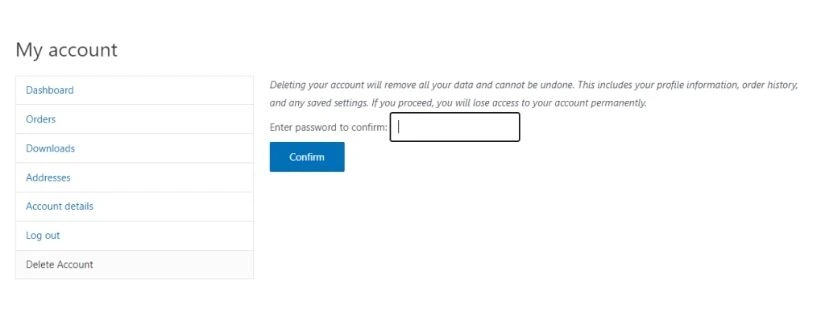
Install and activate it, and a “Delete Account” tab shows up automatically on the WooCommerce My Account page — no template edits, no shortcodes, no setup. If you’re not on WooCommerce, there’s a Gutenberg block and a [wp-frontend-delete_account] shortcode you can drop on any page instead.
Step 2: Customer starts the deletion
They click into the Delete Account tab and immediately see a warning – what’s getting deleted, and that it can’t be undone. No surprises, no accidental clicks.
Step 3: Identity Verification
They’re asked for their current password before anything happens. Simple, but it closes the door on shared-device or hijacked-session deletions.
Step 4: Secure Data Processing
Once confirmed, the plugin deletes their personal data and anonymises their order records – names, emails, and billing info stripped out, totals kept intact for your records.
Step 5: Confirmation Email Sent
An email goes out automatically confirming the deletion. That’s your audit trail, sorted, with zero manual effort.
Step 6: Logout and Redirect
The customer’s logged out and redirected right away. Clean finish, nothing left hanging.
Bonus – Role Exclusion Controls
You can exclude specific roles — admins, shop managers, whoever you don’t want anyone accidentally deleting. One setting, no risk of losing a backend account by mistake.
Put it all together and you’ve got a GDPR-compliant deletion flow running on autopilot, no custom dev, no ongoing admin work.
For complete setup instructions covering WooCommerce, non-WooCommerce, and Classic Editor configurations, see the official plugin documentation and tutorial.
Frequently Asked Questions
Can customers delete their own WooCommerce account by default?
No. There’s nothing built in for this — deletion has to be done manually by an admin from the WordPress dashboard. That gap is exactly what can leave a store non-compliant with GDPR or CCPA if it’s not addressed.
Does deleting a WooCommerce account delete order history?
Depends how it’s done. A hard delete removes the user entirely and orphans their orders, they’re still in the database, just no longer linked to anyone, which messes with your reporting. Anonymising instead, stripping names and contact details but keeping the financial data, is the safer route.
Is frontend account deletion required under GDPR?
Not specifically, GDPR requires you to honour erasure requests, but it doesn’t dictate how. That said, a self-service option takes the manual burden off you, gets requests processed faster, and shows you’re being proactive about it rather than waiting for someone to chase you down.
What happens to active orders or subscriptions when an account is deleted?
They’re affected, so it’s worth either blocking deletion while there’s an open order or active subscription, or at least flagging it clearly before the customer confirms. Saves you a support headache and an accidental cancellation later.
Can I control which users are allowed to delete their account?
Yes, if you’re using a plugin like WP Frontend Delete Account PRO. You can exclude roles like admins or shop managers so nobody important can self-delete by accident.
Conclusion
Letting customers delete their own WooCommerce account isn’t just about ticking a compliance box, it builds trust. Shoppers care more about their data than ever, and stores that make this easy tend to earn more loyalty for it.
The catch is that WooCommerce doesn’t offer this out of the box, and building it yourself means custom PHP, verification flows, emails, and anonymisation logic, a lot of moving parts to get right.
WP Frontend Delete Account PRO takes care of all of it automatically, verification, anonymisation, confirmation emails, role exclusions – and setup takes minutes rather than days. Try WP Frontend Delete Account PRO by Mini Plugins today.


Leave a Reply