Sometimes you need everyone logged out of WordPress at once, whether your site’s been compromised, you’re making changes, or you want to stop password-sharing on a membership site. WordPress has no built-in way to do this.
Method 1: Force logout all users by replacing your authentication keys
This works because changing your secret keys invalidates every login cookie site-wide.
- Go to the WordPress.org secret key generator and copy the generated code
- Open your site’s wp-config.php file (via File Manager or FTP)
- Find the block starting with
define('AUTH_KEY'...)and replace it entirely with what you copied - Save the file
Every user, including you, gets logged out immediately and has to log back in.
Back up wp-config.php before you touch it. A typo here can take the whole site down, and this method is all-or-nothing. You can’t log out one specific user this way, only everyone at once.
Method 2: Force logout all users with a code snippet
If you’re comfortable with code, WordPress core has a built-in function for this: wp_destroy_all_sessions()
The safest way to run it is through WP-CLI, since it doesn’t require editing any live file:
wp eval 'wp_destroy_all_sessions();'
If you don’t have WP-CLI access, you can add the same function to a temporary admin-only page or your theme’s functions.php, run it once, then remove it. Either way, it clears every session token from every user, including you.
This has the same all-or-nothing limitation as Method 1, and editing functions.php carries the same file-editing risk as editing wp-config.php. WP-CLI avoids that risk entirely, so use it if you have access.
Method 3: Force logout all users with the free WPForce Logout plugin
WPForce Logout does the same job with no file or code editing.
- Go to Plugins → Add New, search “WPForce Logout,” install and activate
- Open the Users tab. You’ll see online/offline status and last login time for every account
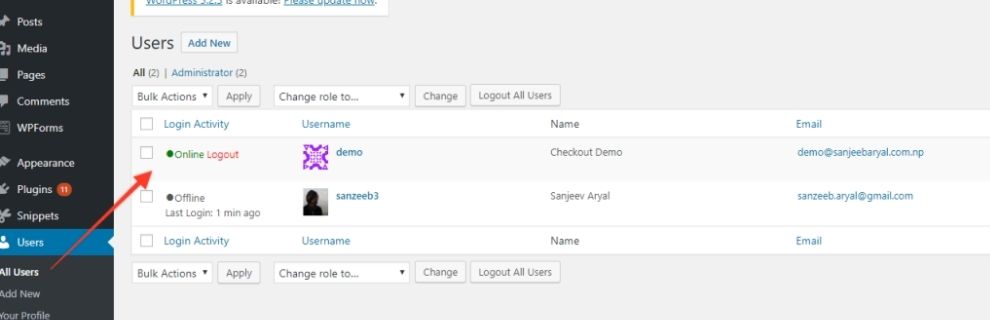
- Use Force Logout All Users for a site-wide logout, or select specific users and use the bulk action to log out just them
That’s the whole setup. No configuration screen, nothing to break. If you want the full walkthrough with screenshots, here’s the complete setup guide. You can also see it listed directly on WordPress.org before installing.
Comparing all three methods
| Feature | Manual (wp-config) | Code Snippet | WPForce Logout (Free) |
|---|---|---|---|
| Needs file or code access | Yes | Yes, unless using WP-CLI | No |
| Risk of breaking the site | Yes, if there is a typo in the config file | Yes, if the code is added incorrectly | No |
| Log out one specific user | No, logs out everyone | No, logs out everyone | Yes |
| See who is online first | No | No | Yes |
| See last login activity | No | No | Yes |
WPForce Logout has 50+ five-star reviews on WordPress.org since it launched in 2018, most of them from people who found it while dealing with the exact situation above.
FAQ
Will force logout affect unsaved work?
Yes. Anyone actively editing loses unsaved changes when logged out. Warn users first if you can, or avoid logging out admins mid-edit.
Does this work with caching or security plugins?
Yes. It runs on WordPress’s core session handling, so it doesn’t conflict with caching layers or security plugins.
Can I log out just one user instead of everyone?
Yes, with the plugin. Both the manual and code methods can’t target individual users, but the free plugin lets you select and log out one account or a group.
Is it safe to use on a live site?
Yes, the plugin only ends sessions, it doesn’t touch site files or settings. The manual and functions.php methods carry more risk since they involve editing files directly; WP-CLI avoids that.
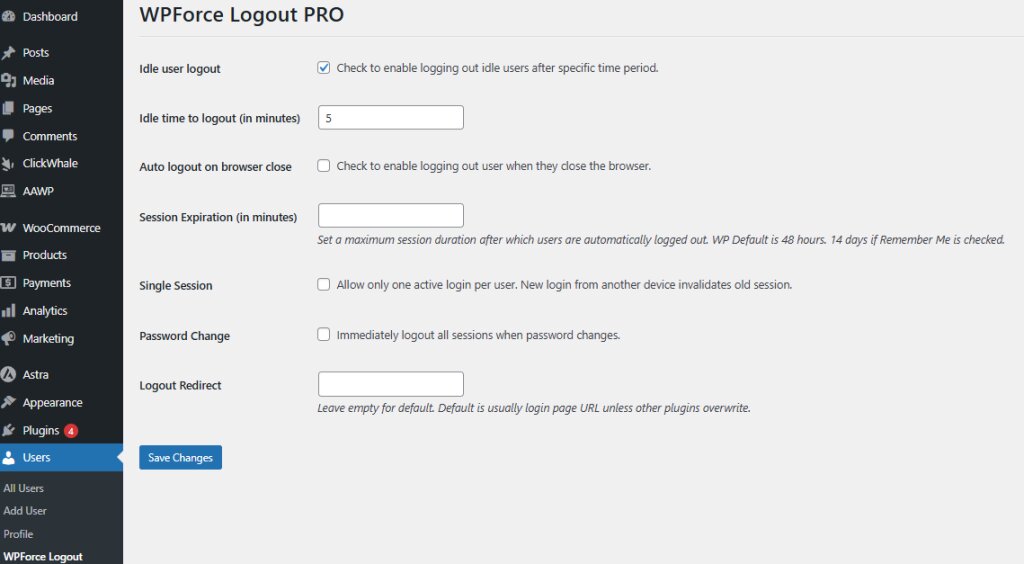
If you need users logged out automatically instead of triggering it yourself, WPForce Logout PRO adds a few extra layers on top of the free plugin. Idle user logout signs people out after a set period of inactivity, so an unattended session doesn’t stay open indefinitely. Auto logout on browser close ends the session the moment someone closes the tab, useful on shared or public computers. It also adds single active session limits, so an account can only be logged in from one device at a time, and logout on password change, which ends every other session the moment a password is reset.

Samikshya Sapkota is an SEO practitioner and content writer working with Mini Plugins. She focuses on building content that drives real organic traffic, from keyword strategy to publish-ready blog posts for WordPress, WooCommerce, and eCommerce audiences.


Leave a Reply