
Guest checkout is great for conversions – but it quietly breaks your customer data. Every guest order sits disconnected from that customer’s account, even if they check out as a guest ten times. Your reports, loyalty programs, and marketing lists never see the full picture.
WooCommerce Order Recovery Pro fixes this without touching your workflow. It runs quietly in the background, matching guest orders to the right customer account by billing email — no manual merging, no settings to configure.
Built for WooCommerce stores, the plugin quietly runs scheduled processes to ensure every possible order is correctly associated with the right customer.
Why This Matters More Than It Seems
Every guest order that never gets linked to an account is a blind spot:
- Reporting is skewed. Repeat customers appear as first-time buyers every time they check out as a guest, understating your actual retention and repeat-purchase rate.
- Loyalty and rewards programs leak value. A customer who’s ordered from you five times as a guest gets treated as a stranger, and never qualifies for tier-based perks or point accumulation.
- Marketing segments are incomplete. Email campaigns built on purchase history miss customers whose orders live outside their account.
- Support takes longer. Without a unified order history, staff have to manually search guest orders by email every time a returning customer reaches out.
The more guest checkouts your store processes, the bigger this blind spot gets – and it compounds silently over time.
Is This a Fit for Your Store?
You’ll see the clearest impact if:
- A significant share of your checkouts happen as a guest
- Your business depends on repeat purchases or subscriptions
- Customer data feeds into marketing automation, segmentation, or loyalty programs
- You’re currently reconciling guest vs. account orders manually in your reports
If your store sees very little guest checkout activity, the plugin still runs safely in the background – the impact will just be smaller.
Installation and Configuration
Once you purchase the WooCommerce Order Recovery Pro plugin, you’ll get the plugin zip file and plugin license key in the email.
Install, activate the plugin and enter your license key. That’s it.
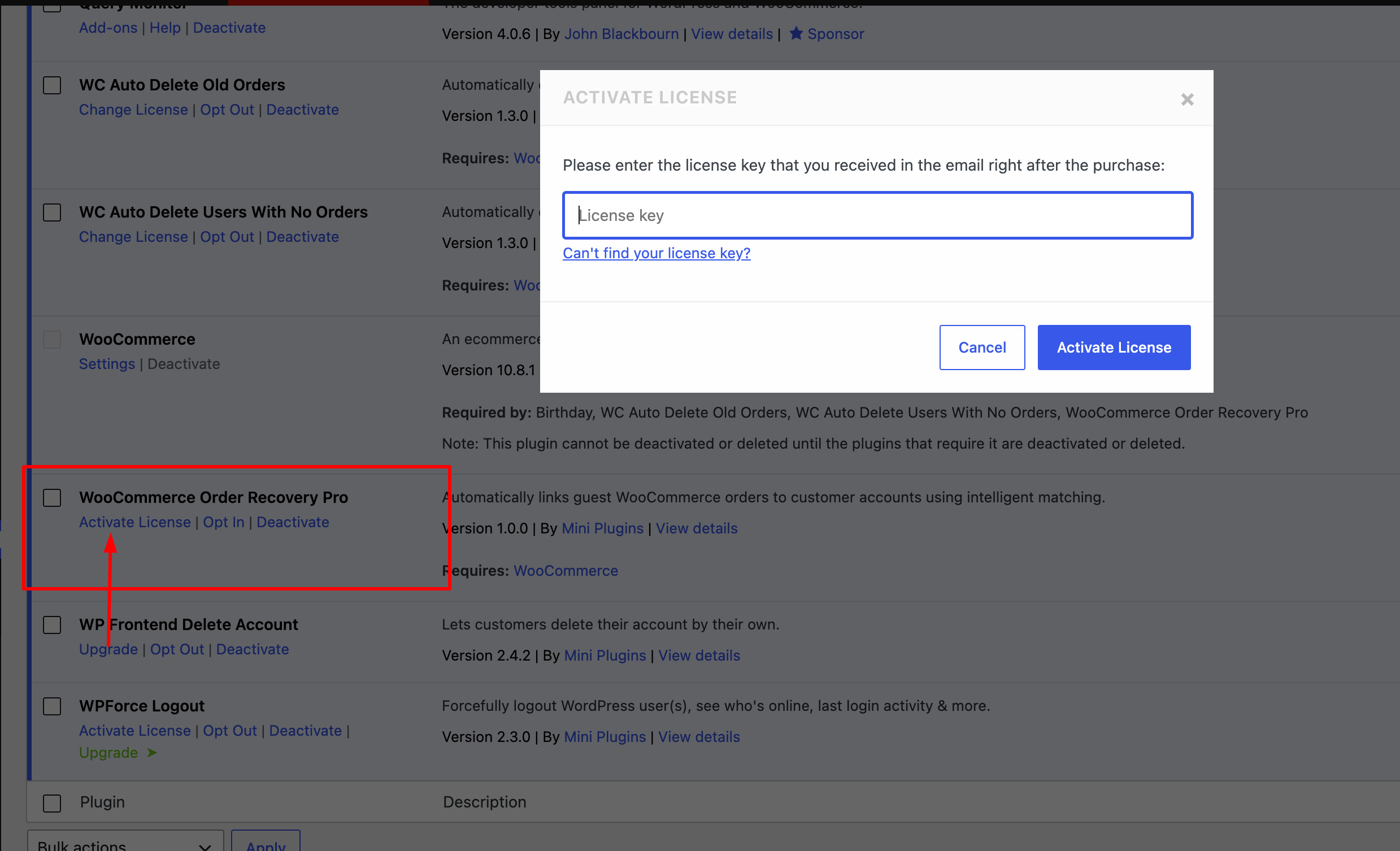
The plugin works on the background. No settings or configuration required.
WooCommerce Order Recovery Pro links guest orders to customer accounts in three simple ways:
- When a customer checks out while logged in
The order is automatically assigned to their existing account. - When a customer creates an account after ordering as a guest
The plugin matches the email and connects previous orders to the new account. - Through background automatic scanning
A scheduled process regularly checks old guest orders and links them to matching customer accounts using billing email.
Monitor activity through logs
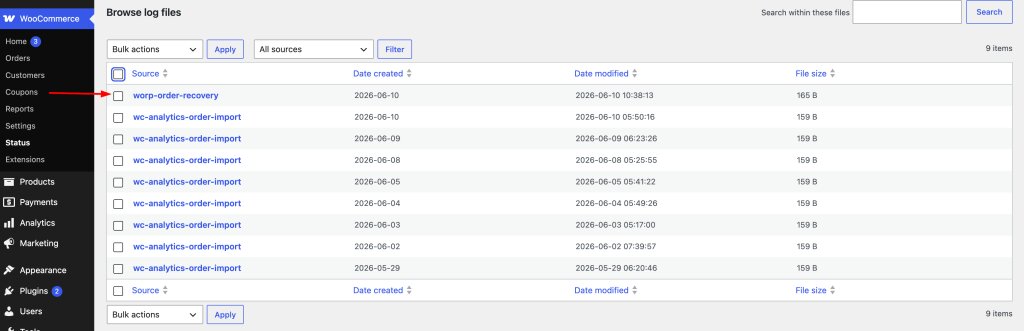
You can view everything the plugin is doing:
Go to WooCommerce → Status → Logs
Here you will see:
- Orders matched
- Background processing batches
- Any skipped or duplicate entries
Frequently Asked Questions
Does WooCommerce Order Recovery Pro work with guest checkout orders placed before I installed the plugin?
Yes. The background scanning process checks existing guest orders too, not just new ones, and links them to matching customer accounts using billing email.
How does the plugin know which account to link an order to?
It matches by billing email — either an account you’re logged into at checkout, or one created afterward using the same email as a past guest order.
Do I need to configure any settings after activation?
No. Once the license key is entered, the plugin runs automatically in the background with no settings required.
Where can I check if orders are being linked correctly?
Go to WooCommerce → Status → Logs to see matched orders, background processing batches, and any skipped or duplicate entries.
Ready to Stop Losing Customer Data to Guest Checkout?
Every guest order that goes unlinked is a customer relationship your store can’t fully see. WooCommerce Order Recovery Pro fixes that automatically — no manual merging, no ongoing maintenance, just accurate customer data running quietly in the background.
Get WooCommerce Order Recovery Pro →

Sanjeev Aryal is the creative mind behind Mini Plugins, a brand dedicated to developing lightweight, efficient WordPress plugins. He also writes occasionally and contributes to WordPress community.


Leave a Reply