
WooCommerce account deletion is one of the most important features of online store management, but it’s also one of the most overlooked. Out of the box, WooCommerce doesn’t allow customers to delete their own accounts. When a user signs up, their personal data is stored forever in your database (unless an administrator deletes it manually).
Having no deletion path is a growing problem for store owners. And storing user data without a way to delete it is not only inconvenient but also a legal liability under data privacy laws such as GDPR, CCPA, and similar regulations now in effect across the UK, Canada, Australia, Brazil, and beyond. But beyond compliance, there are security risks, database bloat, broken trust in users, and more.
In this guide, we will cover why WooCommerce account deletion matters, its benefits and drawbacks, best practices for doing it safely, and how to implement it without writing a single line of code.
Why WooCommerce Account Deletion Matters for Store Owners
Many store owners think that it’s always a good thing to keep user accounts; more registered users mean more data, more remarketing opportunities, and more potential returning customers. That reasoning is somewhat valid, but it ignores several serious drawbacks that only worsen as inactive accounts pile up.
1. Respect for the law Under the GDPR and CCPA
The GDPR Right to Erasure, commonly referred to as the “right to be forgotten,” requires that if a customer requests the deletion of their data, you must comply promptly. Similarly, the CCPA grants California residents this same right. If your store lacks an effective account deletion mechanism, it may be considered non-compliant, which could expose your business to fines and legal repercussions.
Having a deletion option that users can access themselves, rather than relying on an admin to do it manually, is quickly becoming the expected standard. It shows your customers that you take their data seriously, and it saves you from having to handle every deletion request by hand.
2. Security Concerns for Dormant Accounts
All possible points of attack are inactive accounts. Inactive WooCommerce accounts are likely to use weak or reused passwords that may have been exposed in unrelated data breaches. One common way to do this is via credential stuffing attacks, where hackers use stolen username/password combinations to try them out on thousands of sites.
The “Have I Been Pwned” database has billions of compromised credentials from past breaches. If even a fraction of your inactive users reuse those credentials, then your store is a target. Fewer dormant accounts means less attack surface.
3. Effects of Database Bloat on Performance
If you’ve been running a WooCommerce store for several years, you likely have thousands of registered accounts – many of which are from customers who made a one-time purchase years ago and never came back. Each of these accounts stores user metadata, billing/shipping addresses, order references, etc.
This database bloat has a direct impact on query performance, backup sizes, and server load. It’s an important part of keeping store performance up, keeping your user data clean.
4. Trust and Transparency with Consumer
Customers are more aware of their data rights than ever before. If you don’t make it easy for a customer to delete their account, they might just lose faith in your brand, leave a bad review, or worse, send a formal data erasure request that you now have to process manually. Offering an easy, DIY way to delete sends a clear message that you care about your customers and their data.
Potential Drawbacks of Account Deletion
Loss of Order History: If you delete your WooCommerce account, you may also delete or unlink any associated order records. For accounting and tax compliance, you should keep anonymized order data, removing personal identifiers while retaining financial data.
Impact on Email Marketing & Analytics: A deleted account indicates the user is removed from your email campaigns, loyalty programmes, and analytics tracking. This is expected and the right thing to do; you cannot legally continue marketing to someone who has asked for erasure. Make this clear in your privacy policy and on the deletion confirmation screen.
Accidental Deletions: Without the proper safeguards, a user could even accidentally delete their own account. A confirmation step – whether it be re-typing a password or verifying via email – is non-negotiable. You should also provide a prominent warning of irreversibility before deletion is made final.
Best Practices for Safe WooCommerce Account Deletion
Whether you implement frontend deletion manually or with a plugin, these practices ensure the process is secure, compliant, and user-friendly.
1. Require Identity Verification Before Deletion
Always ask the user to authenticate before deleting anything, by confirming their password or clicking a one-time link in an email. Without it, an attacker who hijacked a session or shared a device could delete another person’s account.
2. Display Clear and Prominent Warnings
The deletion screen should be very clear about what will be lost i.e:, personal information, saved addresses, access to orders, loyalty points – and that this action cannot be undone.
3. Anonymize Order Data Rather Than Hard Deleting It
Keep anonymized order records after deletion for financial and tax compliance. The order data should include the strip names, email addresses, and billing info, but should still include totals and transaction data. This is in line with privacy regulations and accounting requirements.
4. Send a Deletion Confirmation Email
After deletion is processed, send the user a confirmation email. This provides them with documented proof that their data has been deleted, and gives you a verifiable audit trail – critical evidence in the event of a regulatory enquiry.
5. Document the Process in Your Privacy Policy
Your privacy policy should explain how users can delete their accounts, what data is deleted and what is retained (e.g., anonymized orders), and how long the deletion process takes. Here, transparency is a legal obligation and a trust signal.
What Frontend Account Deletion Means — and How WP Frontend Delete Account PRO Delivers
To manually implement all of the above in WooCommerce means custom PHP development, template overrides, a complete verification flow, email notifications, and data anonymization logic, all without breaking existing WooCommerce functionality. For most shop owners, that’s not possible.
That is precisely why WP Frontend Delete Account PRO by Mini Plugins was developed. It adds frontend account deletion to your WooCommerce store without you having to write a single line of code and automatically handles all the downsides and best practices mentioned above.
This is the exact process of how the plugin works, from installation to deletion:
Step 1: Automatic WooCommerce Integration
Once installed and activated, the plugin automatically adds a “Delete Account” tab on the WooCommerce My Account page. You don’t need to edit templates, add shortcodes, or do any custom configuration. If you’re not using WooCommerce, the plugin also features a Gutenberg block and a [delete_account] shortcode to place the deletion form on any page of your website.
Step 2: User Initiates Deletion
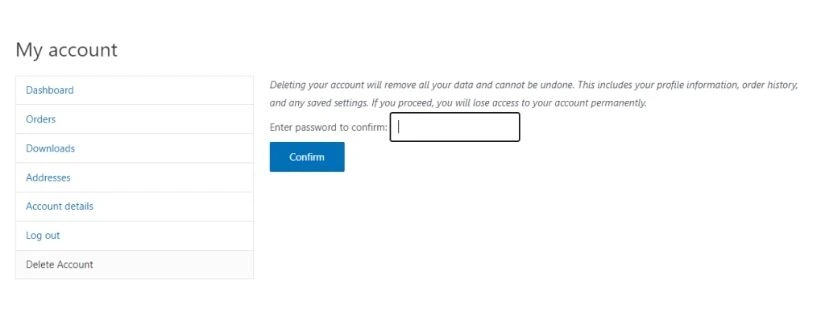
The customer goes to the Delete Account tab in their account. They immediately see a warning screen detailing what will be deleted: personal data, saved addresses, and account access, and a clear statement that this action cannot be undone. This directly tackles the risk of accidental deletions.
Step 3: Identity Verification
The user is prompted to enter the account’s current password to continue. This helps prevent accidental removals and safeguards against the deletion of shared devices or the compromise of sessions. This is consistent with the identity verification best practice discussed above.
Step 4: Secure Data Processing
Once confirmed, the plugin deletes the user’s personal data and anonymizes their order records – removing names, emails, and billing details while keeping order totals intact for your financial records.
Step 5: Confirmation Email Sent
The plugin automatically sends an email to the user confirming the deletion. This provides them with documented proof that their data has been removed and gives you an audit trail to prove GDPR and CCPA compliance. This meets the paper trail requirement with no manual effort.
Step 6: Logout and Redirect
The user is logged out and redirected instantly, and it’s a clean process, no loose ends.
Bonus – Role Exclusion Controls
There is an exclusion role option in the plugin that lets you choose which user roles can self-delete. You can fully exclude administrators, shop managers, or any role you want to protect so that you don’t inadvertently remove critical backend accounts.
The result is a fully automated, GDPR-compliant deletion flow that addresses every concern raised in this guide, from order anonymization to confirmation emails, without any custom development or ongoing admin effort.
For complete setup instructions covering WooCommerce, non-WooCommerce, and Classic Editor configurations, see the official plugin documentation and tutorial.
Conclusion
WooCommerce account deletion isn’t optional; it’s core to running a compliant and trustworthy store. The legal risks are real. The security implications are serious. Customers increasingly demand it.
WP Frontend Delete Account PRO lets you set up a full GDPR compliant deletion flow in minutes, without any custom development. All identity verification, order anonymization, confirmation emails, and role controls are automatically handled.
Give your customers the power they’ve earned. Try WP Frontend Delete Account PRO by Mini Plugins today. 100% money back guarantee included.


Leave a Reply